State of the Home Server 2025
·
cenotaph's docs
What my setup at home looks like right now.
Recently I was asked to post a breakdown of what my setup looks like, to show an example of what a more ad-hoc server setup looks like. Really, servers can be any computer, the power of the computer just dictates what you can potentially host with it. Even an old cell phone can be a good server if set up well. There are purpose built NAS devices that are convenient because of their large number of drive bays, but a lot will make sacrifices around some of the hardware they choose because they are only expecting them to ever be used as a NAS by the majority of users, not so much a multi-purpose home server.
So, here's how I did it when I made the jump from more hand-holding Synology NAS systems to a homespun Linux server.
The Hardware
Now, this is the 3rd server I've built since I started selfhosting, so I had my sights set a little higher than you would need to get started. I run a lot of different services on mine for myself and my close friends, mainly free or libre versions of corporate Software as a Service programs. Mostly because I have gotten so sick of rent-seeking subscriptions. I want to own the programs I buy, not lease them. For more single-purpose servers like a box just for running Jellyfin, you likely don't need anywhere near the processor I'm using.
When speccing out your own home server build, I encourage you to first start with something less overkill unless you know you really want to be running a lot of shit at once. Take a look at Cyclic Circuit's "You probably don't need as many resources as you think" portion of his Handsoff Selfhosting Guide.
The main piece of my setup is actually a prebuilt workstation mini pc, oddly enough. I'm using the Minisforum MS-01 as the base of things. Credit where credit is due, it was recommended to me originally by CyclicCircuit It has a small form factor, making it useful for stashing in the home environment. The two big things that make this useful as a home server are:
- all of the processor options it comes with are quite fast as well as having a good number of cores which makes it ideal for running a number of services at once without a bottleneck
- It has excellent I/O - it comes with two thunderbolt 4 ports, two SFP+ ports (10 Gbps), and two 2.5Gbps RJ45/ethernet ports
This means that despite having only m.2 bays, we can quite easily attach a number of HDDs either through network storage or through thunderbolt 4 connection, which is what I did. I currently have all of my hard drives stored in a Mediasonic Probox 8-bay. The new versions are better options, but I was able to get this USB 3.0/esata version on a good deal so it's what I'm using for now. Note though, if you do go this route: many of the cheaper options for these types of JBOD(Just a Bunch Of Disks) storage will have poor quality USB controllers. This means that under high load, they are liable to drop the USB connection to your system randomly which at minimum causes problems and at worst corrupts data. Make sure you read the reviews of any you buy. The mediasonic ones all seem to have a good enough controller in my experience. Really though, any random consumer PC case with a good number of storage bays or fast ports on it's motherboard.
As for hard drives inside that probox, I'm currently using a number of 20TB Seagate Barracuda Compute hard drives in a RaidZ1 (discussed below in "Initial Install") array. These are generally pretty good price per TB, though because of this they are frequently out of stock so jump on them where you can find them. They also come in a 24TB version I believe, which is even better $/TB, but I'm locked into 20TB since I started with them due to the nature of the storage array so here we are.
For the root disk of the server, I'm using a Samsung 970 Evo Plus NVME m.2 storage module. This allows for very fast caching and storage of commonly used db or config files, while storing the large stuff like streaming media on the HDD array.
For the actual specs I chose for my MS-01, I knew I wanted to do server work with it, so I went with the i9-13900H model. This is really useful for server applications because it has high clock speeds, but it also has 14 cores and 20 threads, meaning it is very good at multitasking. To start with, I set it up with 32GB of DDR5. I had intended to upgrade it to 64GB, but unfortunately RAM prices just sextoupled because openAI bought like, 2/3rds of the worlds RAM production so that's probably going to have to wait a while.
The Initial Install
Currently, I am running Ubuntu Server 24.04 (soon to be LTS) as my operating system installed on bare metal. The primary reasons for this are that I am already familiar with Ubuntu, and it is a very popular distro which means that there is lots of troubleshooting information available out there. In my opinion when choosing the distro or OS you are going to use for your server, you should use either what you know extremely well or what's popular, even if it is just for ease of troubleshooting.
You may notice I chose Ubuntu Server over Ubuntu Desktop, this means it does not ship with any kind of DE or Desktop Environment. It is intended to be operated entirely through SSH or remote connection, and is what we would call a "Headless" server. You can use a distro or operating system that uses a Desktop Environment should you so desire, but just remember that rendering the displays takes both ram and resources away from other services you are runnning on the server. While it can be a little scary at first because it is different, in my opinion it is worth learning to use headless server distros as in the long term it will help you a lot, as many of the best server utilities are CLI only (in my experience) or can be accessed through a webUI, saving your resources for the actual services you will be running.
One of the main reasons for running an LTS image is that you will not need to do a full version upgrade for quite a long time. With Ubuntu, an LTS release will continue receiving security updates for 5 years, or 15 if you shell out for Ubuntu Pro. In general, when it comes to servers, you want stability. Often this means you want security updates more than you want feature updates, as feature updates make breaking changes sometimes while security updates just patch vulnerabilities and make far fewer (if any) breaking changes.
As for the other software running on bare metal, I've chosen ZFS for my file system on my mass storage array (my stack of hard drives) primarily because it is one of the most resilient filesystems I've come across. I cannot stress how many times I screwed up when migrating from my old synology server, and I lost exactly zero bytes of data. I have my storage array set up in a ZFS Raid (RaidZ1) array. With this, not only do we receive the copy-on-write snapshots like we do on BTRFS (as discussed in my CachyOS post), but we also receive 1 disk fault-tolerance, and faster read speeds than traditional RAID5. This is achieved by striping the data across the drives, meaning that different pieces of files are distributed across the disks, allowing the system to pull from several disks simultaneously to read the same file faster than it could in a traditional sequential read on one disk. It achieves the fault tolerance by ensuring that every bit of data exists in at least 2 places, and on at least 2 separate disks.
Now, it is important to note here that any RAID sytem like this that allows for one disk failing is an uptime solution, not a backup solution. For any files that you care about and cannot easily find again, you want to have a 3-2-1 backup strategy. An example of data I don't back up is extremely popular media, as if that is lost it is easily re-downloadable in the future.
On my actual root drive NVME I'm currently running simple ext4, but on future builds I will likely be using BTRFS for the same copy-on-write snapshot reasons that I use ZFS. I already use BTRFS for my root filestsytem on both of my personal use machines and as I discuss in my CachyOS post, I find that it gives me a whole lot of peace of mind in trying new things on my Linux systems without fearing for bricking my system or something if I don't perfectly execute a command.
Other than that, almost everything I do on my server is through docker containers, allowing for easy compartmentalization and makes getting the same system working on different machines a lot easier.
The Stack
Now that we have broached the topic of Docker, we can get into what my current setup looks like container-wise. Note: some of these are single containers, some of them are small stacks of containers build around specific containers. I've linked to any I've done guides about, the rest should be easily available on the search engine of your choice. As of right now, I'm running:
- dockge
- *arr stack
- qbittorrent
- gluetun
- jellyfin
- jackett
- byparr
- newt
- pangolin
- ntfy
- qui
- cross-seed
- seerr
- syncthing
- watchtower
- beszel
- soulseek
- freshrss
- immich
- flatnotes
- findmydevice
- convertx
- crowdsec
Networking
While the majority of how my networking is handled is gone over in my qbit+gluetun and pangolin+crowdsec guides, I thought I would include here a little mind map I have put together that sort of outlines the "shape" of how my network is. Not quite a real network map or anything because this consolidates some stacks into a single node and I've left out ones that don't do very much or any networking for simplicity.
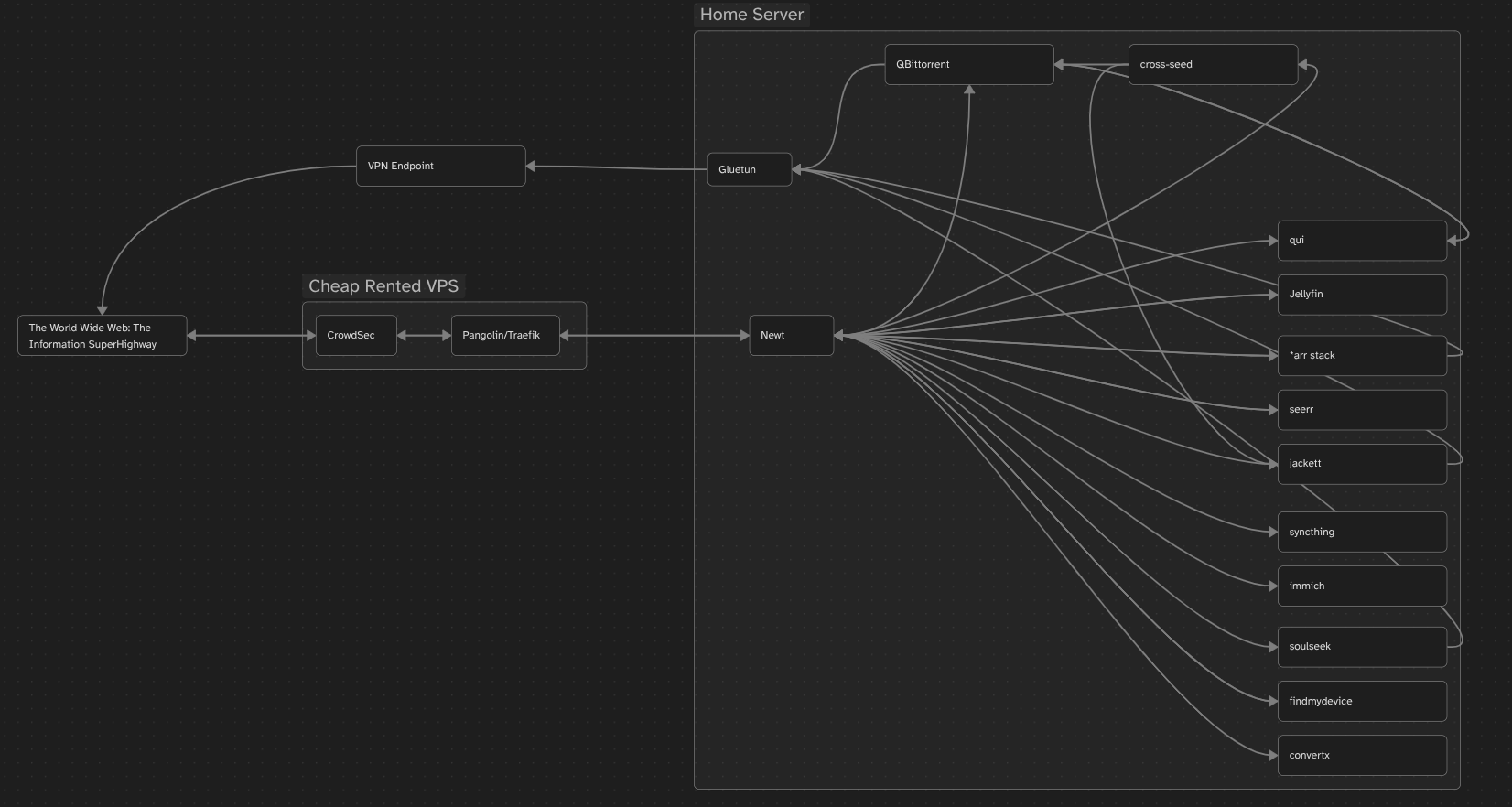
Basically, any WebUI or external regular traffic goes through crowdsec and pangolin, as my "face" to the web. This gives a good shield against the constant port scanning and vulnerability testing that various bad actors are doing across the entire ipv4 address space at all times every day. Crowdsec allows me to join a network of a large number of other users on a blocklist based on the learning of all crowdsec instances regarding IP addresses of bad actors and dropping their connections before they get a chance to waste your bandwidth and system resources.
After being approved, a connection is routed by traefik through a wireguard tunnel to newt on the home server, acting like a cloudflare tunnel but hosted by me instead of an intentional man in the middle attack on myself.
For any connections that I would prefer some privacy for, those connections are routed through Gluetun and out through a VPN endpoint of my choice.
That's all, folks!
I'll probably end up updating this or fleshing out some of the parts I was more brief on, but for now this will do and I'm going to go to bed. As usual, any questions feel free to @ me in any mutual groups or hit me up in my signal room.